Task Detail View
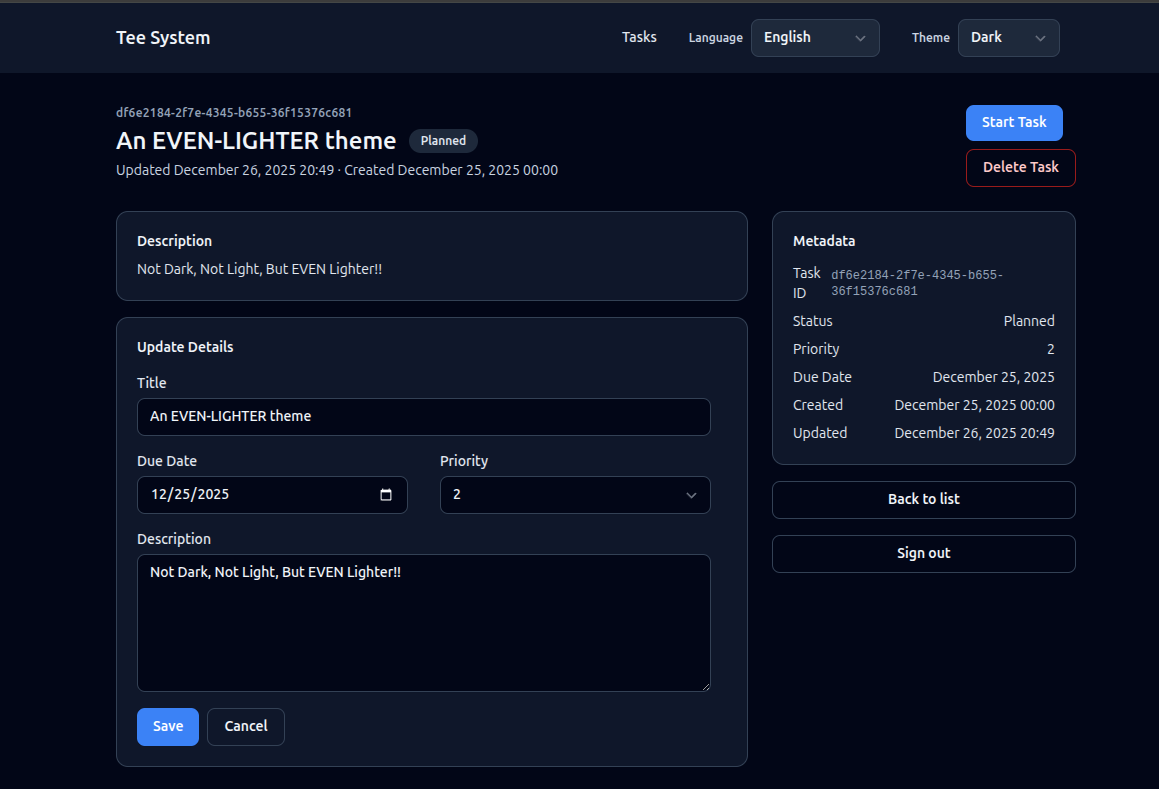
The Task detail view shows one task and lets the user act on it. This is where commands (state changes) appear.
What the user sees
- Title, description, status, and metadata (created, updated, due, priority).
- Buttons to start or complete a task, based on status.
- A form to update details.
- A button to delete the task.
Task detail screen image
Route and handler
- Route:
GET /tasks/:id - Handler:
task_detailinsrc/interface/routes_web.rs - Template:
templates/task_detail.html
The handler:
- Checks authentication and CSRF availability.
- Calls the get-task query.
- Computes which actions are allowed.
- Renders the template.
Example logic:
#![allow(unused)]
fn main() {
let task = queries::get_task::handle(&st.pool, &principal, id).await?;
let can_start = task.status == TaskStatus::Planned;
let can_complete = task.status == TaskStatus::InProgress;
let can_edit = task.status != TaskStatus::Completed;
}
User interactions
The detail page supports several user actions:
- Start task
- Complete task
- Update details
- Delete task
Each action is a form submit (POST). The server validates CSRF, runs the command, and redirects back to the appropriate page. This is the same PRG pattern you saw in the create flow.
Query layer
The detail view uses GetTask from src/app/queries/get_task.rs.
It reads a single task and returns a domain Task.
Important: deleted tasks are excluded by default using
fetch_task_active in src/data/task_repo.rs.
Action buttons are commands
Buttons in the detail view post to command routes:
POST /tasks/:id/start-> StartTaskPOST /tasks/:id/complete-> CompleteTaskPOST /tasks/:id/update-> UpdateTaskDetailsPOST /tasks/:id/delete-> DeleteTask
These routes live in src/interface/routes_web.rs and call the command handlers
in src/app/commands/*.
Code example: status transition in StartTask
From src/app/commands/start_task.rs:
#![allow(unused)]
fn main() {
let mut tx = pool.begin().await?;
let row = shared::fetch_task_required(&mut *tx, cmd.id, StartTaskError::NotFound).await?;
let current = shared::parse_status(&row.status, StartTaskError::InvalidStatus)?;
if !can_transition_task(row.is_deleted, current, TaskStatus::InProgress) {
    if row.is_deleted {
        return Err(StartTaskError::TaskDeleted);
    }
    tracing::warn!(
        task_id = %cmd.id,
        from = %current,
        to = %TaskStatus::InProgress,
        "invalid task transition attempt"
    );
    return Err(StartTaskError::InvalidTransition);
}
}
Optimistic concurrency (explained)
Each task has a row_version column. When you update or change status, the
command includes the expected row version. The SQL update is guarded by:
WHERE id = $id AND row_version = $expected_row_version
If another user updated the task first, the update affects 0 rows and the command returns a conflict. This is optimistic concurrency.
Why it matters:
- It prevents accidental overwrites.
- It avoids heavy locking.
Full flow: start task (Mermaid)
sequenceDiagram
    participant Browser
    participant Router as Axum Router
    participant Command as StartTask Command
    participant Repo as Task Repo
    participant DB as Postgres

    Browser->>Router: POST /tasks/:id/start
    Router->>Command: start_task(id, row_version)
    Command->>Repo: update_task_status(tx)
    Repo->>DB: UPDATE ... WHERE row_version=expected
    DB-->>Repo: updated / 0 rows
    Repo-->>Command: result
    Command-->>Router: redirect or conflict
Exercise
- Add a read-only badge to show the task ID in the detail template.
- Add a warning message if the task is completed (read-only mode).
Next: Task Create and Update.