Task Create and Update
This chapter covers how tasks are created and edited. These flows show how validation, commands, and redirects work together.
Create view
User experience
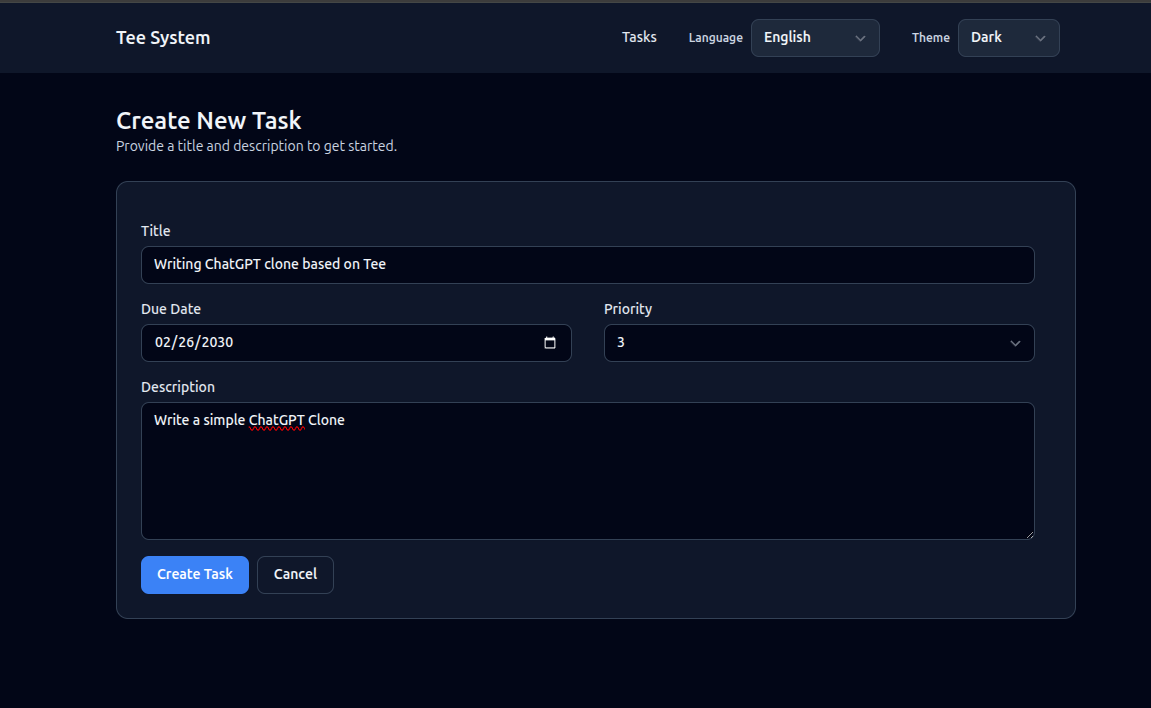
- A form with title, description, due date, and priority.
- Submit creates a task and redirects back to the list.
Where it lives
- Route:
GET /tasks/new->task_new - Route:
POST /tasks->tasks_create - Template:
templates/task_new.html - Command:
CreateTaskinsrc/app/commands/create_task.rs
Image
- PLACEHOLDER: Task create screen image.
Task create screen image.
How the form works
The create form is a normal HTML form. When the user clicks the submit button:
- The browser sends a POST request to
/tasks. - The interface layer validates the input.
- The create command runs inside a transaction.
- The server responds with a redirect to
/tasks.
This flow works without JavaScript and is easy to debug.
Code example: handler builds a command
From src/interface/routes_web.rs:
#![allow(unused)]
fn main() {
let cmd = commands::create_task::CreateTaskCommand {
    title_raw: form.title,
    description_raw: form.description,
    due_at: parse_due_date(form.due_at.as_deref(), &invalid_due_msg)?,
    priority_raw: parse_priority(form.priority.as_deref(), &invalid_priority_msg)?,
};

commands::create_task::handle(&st.pool, &principal, cmd).await?;
Ok(Redirect::to("/tasks").into_response())
}
Validation in the create flow
The handler converts raw strings into domain types:
TaskTitle::parseTaskDescription::parseTaskPriority::parse
This keeps rules in one place and avoids validation drift.
Example from CreateTask:
#![allow(unused)]
fn main() {
let title = TaskTitle::parse(&cmd.title_raw)?;
let description = TaskDescription::parse(&cmd.description_raw)?;
let priority = TaskPriority::parse(cmd.priority_raw.unwrap_or(3))?;
}
Update flow (detail page)
Updates happen in the detail view:
- Route:
POST /tasks/:id/update - Command:
UpdateTaskDetailsinsrc/app/commands/update_task_details.rs
Important rules:
- Completed tasks are read-only.
- Deleted tasks cannot be edited.
- Updates use optimistic concurrency.
Code example: update with row_version check
From src/app/commands/update_task_details.rs:
#![allow(unused)]
fn main() {
let updated = task_repo::update_task_details(
    &mut *tx,
    cmd.id,
    &title,
    &description,
    cmd.due_at,
    priority.as_i16(),
    cmd.expected_row_version,
)
.await?;
if updated == 0 {
    return match shared::classify_update_conflict(&mut *tx, cmd.id).await? {
        UpdateConflict::NotFound => Err(UpdateTaskDetailsError::NotFound),
        UpdateConflict::Deleted => Err(UpdateTaskDetailsError::TaskDeleted),
        UpdateConflict::Conflict => Err(UpdateTaskDetailsError::ConcurrencyConflict),
    };
}
}
PRG pattern (Post-Redirect-Get)
After a successful POST, the handler redirects instead of rendering HTML. This prevents double submissions if the user refreshes the page.
Example:
#![allow(unused)]
fn main() {
commands::create_task::handle(&st.pool, &principal, cmd).await?;
Ok(Redirect::to("/tasks").into_response())
}
Delete flow
Delete is a command that marks the task as deleted (soft delete). It is idempotent: deleting an already deleted task is treated as success.
- Route:
POST /tasks/:id/delete - Command:
DeleteTaskinsrc/app/commands/delete_task.rs
Exercise
- Add a “Save and view” option that redirects to
/tasks/:idafter create. - Add a small confirmation dialog before delete (client-side only).
Next: Interface Layer.