Task List View
The Task list view is the home page of the example application. It introduces most of the system in a safe, read-only way.
What the user sees
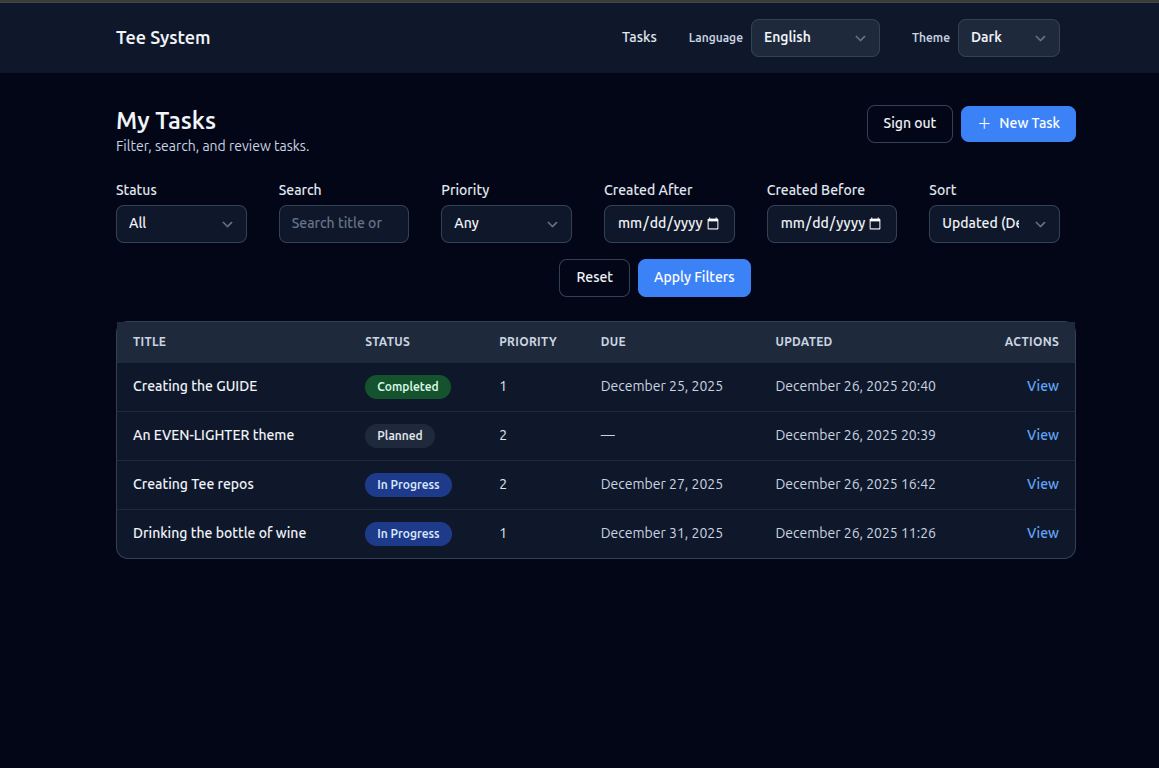
- A list of tasks, each with title, status, priority, due date, and last updated.
- Filters for status, priority, and created date range.
- Sorting by updated date, due date, or priority.
- A primary action to create a new task.
Task list screen image
Route and handler
The list view is served by:
- Route:
GET /tasks - Handler:
tasks_listinsrc/interface/routes_web.rs - Template:
templates/tasks_list.html
The handler does four things in order:
- Check authentication (must be logged in for the UI routes).
- Read and validate query parameters (filters and sort).
- Call the query layer to fetch tasks.
- Render the template with a view model.
How the page is rendered
This project uses server-rendered HTML. That means:
- The handler builds a Rust struct with all the data the template needs.
- Askama renders HTML on the server.
- The browser receives plain HTML.
There is no client-side framework that fetches data after page load. This keeps the behavior predictable and fast to reason about.
User interactions
When a user changes filters or sorting:
- The browser sends a new GET request with query parameters.
- The handler re-runs the query with those filters.
- A new HTML page is returned.
This is simple but powerful. It works even if JavaScript is disabled.
Filtering and validation (explained)
Look at the handler in src/interface/routes_web.rs. It uses helper functions to
parse and validate filters:
parse_date_filterfor created dates.parse_priorityfor priority range.TaskStatus::parsefor status.
Why validate here?
- The handler is the boundary where raw strings become typed values.
- The query layer assumes already-validated input.
Query layer: read-only by design
The handler builds a ListTasksQuery:
#![allow(unused)]
fn main() {
let query = queries::list_tasks::ListTasksQuery {
    status,
    created_after,
    created_before,
    search: params.q.clone().filter(|s| !s.trim().is_empty()),
    priority,
    sort,
    limit: 50,
};
let tasks = queries::list_tasks::handle(&st.pool, &principal, query).await?;
}
This query goes to src/app/queries/list_tasks.rs.
Queries never write to the database. They only read.
Code example: query to repository
From src/app/queries/list_tasks.rs:
#![allow(unused)]
fn main() {
let status_filter = query.status.map(|status| status.as_str());
let params = task_repo::ListTasksParams {
    status: status_filter,
    created_after: query.created_after,
    created_before: query.created_before,
    search: query.search.as_deref(),
    priority: query.priority,
    sort: query.sort.as_deref(),
    limit: query.limit,
};
let rows = task_repo::list_tasks(pool, params).await?;
}
Code example: SQL filtering
From src/data/task_repo.rs:
#![allow(unused)]
fn main() {
let rows = sqlx::query_as!(
    TaskRow,
    r#"
    SELECT id, title, description, status, created_at, updated_at, due_at, priority, row_version, is_deleted, deleted_at
    FROM tasks
    WHERE is_deleted = FALSE
      AND ($1::text IS NULL OR status = $1)
      AND ($2::timestamptz IS NULL OR created_at >= $2)
      AND ($3::timestamptz IS NULL OR created_at <= $3)
      AND ($4::text IS NULL OR title ILIKE '%' || $4 || '%' OR description ILIKE '%' || $4 || '%')
      AND ($5::smallint IS NULL OR priority = $5)
    ORDER BY
      CASE WHEN $6 = 'due_at' THEN due_at END ASC NULLS LAST,
      CASE WHEN $6 = 'priority' THEN priority END ASC,
      CASE WHEN $6 = 'updated_at' THEN updated_at END DESC,
      updated_at DESC
    LIMIT $7
    "#,
    params.status,
    params.created_after,
    params.created_before,
    params.search,
    params.priority,
    params.sort,
    params.limit
)
.fetch_all(executor)
.await?;

Ok(rows)
}
Repository and SQL
The query calls the repository:
src/data/task_repo.rs->list_tasks
The SQL filters out deleted tasks and applies optional filters. This matches SPEC-02.
Full request flow (Mermaid)
sequenceDiagram
    participant Browser
    participant Router as Axum Router
    participant Query as ListTasks Query
    participant Repo as Task Repo
    participant DB as Postgres

    Browser->>Router: GET /tasks?status=PLANNED
    Router->>Query: list_tasks(filters)
    Query->>Repo: list_tasks(params)
    Repo->>DB: SELECT ... WHERE is_deleted=false
    DB-->>Repo: rows
    Repo-->>Query: task rows
    Query-->>Router: Task list
    Router-->>Browser: HTML list page
Exercise
Try this in code:
- Add a filter for “only tasks with a due date”.
- Thread it from the query params, to
ListTasksQuery, to SQL. - Add a small label to the UI that shows when the filter is active.
Next: Task Detail View.